
Remote vs On-Site IT Support: Common Mistakes Arizona Businesses Make
Choosing the right IT support model is not merely a logistical decision but a strategic imperative for business continuity. According to recent industry data, businesses that fail to align their IT support structure with their physical and digital workflows often experience up to 40% more downtime than those with optimized hybrid models. This statistic highlights the critical nature of selecting between remote and on-site assistance. Many organizations in the Phoenix metropolitan area struggle with this choice, leading to inefficient resource allocation and frustrated staff. The goal is to identify which model minimizes disruption while maximizing security and productivity. This guide explores the most frequent errors companies make when evaluating these two essential service pillars.
Mistake 1: Ignoring the Hybrid Advantage
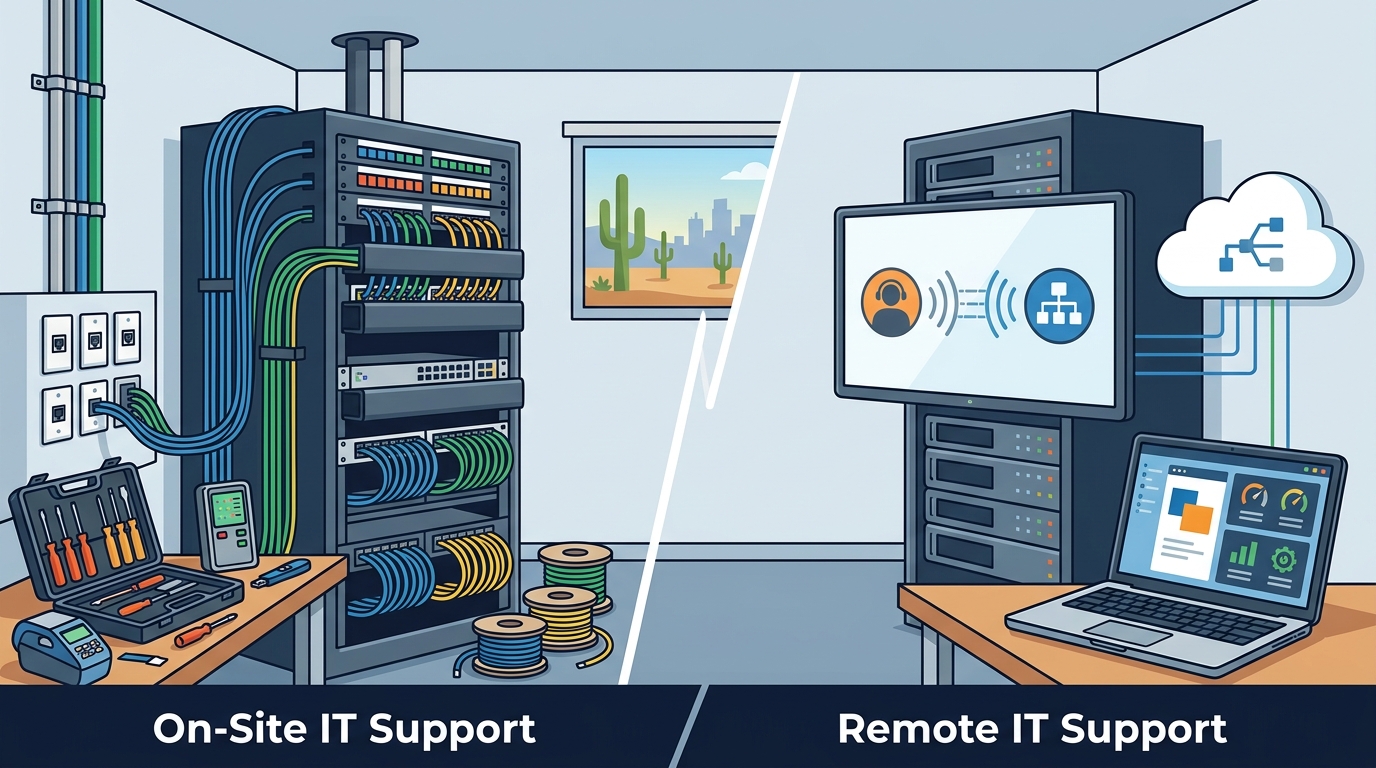
One of the most prevalent errors is viewing remote and on-site support as mutually exclusive options. Many business owners believe they must choose one or the other, leading to gaps in coverage. Remote support is the rapid deployment of digital solutions that allows technicians to resolve software issues instantly without physical presence. Conversely, on-site support is the physical intervention required for hardware and network infrastructure that cannot be accessed digitally. The optimal strategy for most Arizona businesses is a hybrid approach. This model leverages the speed of remote diagnostics for immediate fixes while reserving on-site visits for complex hardware repairs or network cabling projects. By ignoring this synergy, companies risk slower resolution times for simple issues and unnecessary travel costs for complex ones.
TECHtality has operated in Arizona since 1983, providing comprehensive Managed Service Provider (MSP) solutions that blend these capabilities. Their approach ensures that businesses receive seamless support whether the issue is a workstation glitch or a server failure. Understanding this distinction is vital for maintaining operational efficiency. A rigid adherence to a single model often results in either excessive downtime waiting for a technician or unresolved hardware issues due to a lack of physical access.
Mistake 2: Overlooking Physical Infrastructure Needs
Businesses frequently underestimate the complexity of their physical IT infrastructure when relying solely on remote support. While remote tools are powerful, they cannot replace the need for physical maintenance. Network infrastructure is the physical backbone of business connectivity, including routers, switches, and cabling that require hands-on management. For instance, if a business is undergoing an office relocation, remote support is insufficient. Technology relocation requires pre-visit assessments, rewiring, and safe equipment transport to ensure a smooth transition. Companies that fail to account for these physical needs often face prolonged outages during moves or expansions.
Another critical area is the installation of Wireless Access Points (WAPs). Proper placement is essential for optimal coverage, which requires physical site surveys. Similarly, the installation of CCTV and NVR systems demands precise hardware configuration and mounting. Ignoring these physical requirements leads to poor performance and security vulnerabilities. Businesses must recognize that while remote support handles the "soft" side of IT, on-site expertise is non-negotiable for the "hard" infrastructure.
Mistake 2: Underestimating Security Risks
Security is a paramount concern when selecting an IT support model. A common mistake is assuming that remote access inherently compromises security or that on-site support is inherently safer. Both models have distinct security profiles that must be managed carefully. Data security is the protection of information from unauthorized access and corruption, regardless of where the support technician is located. Remote support requires robust encryption and multi-factor authentication to prevent interception. On-site support requires strict access controls to prevent physical tampering with servers and workstations.
Many businesses in the Valley of the Sun overlook the importance of regular security audits that span both remote and physical domains. For example, a remote technician might patch a software vulnerability, but an on-site technician must ensure that the physical server room is secure from environmental hazards and unauthorized entry. Neglecting either aspect creates a blind spot that cybercriminals can exploit. Companies must ensure their IT provider has rigorous protocols for both digital and physical security to maintain a comprehensive defense posture.
Mistake 4: Failing to Define Response Times
Another significant error is vague expectations regarding response times. Businesses often assume that "support" means immediate assistance, but the reality is more nuanced. Response time is the duration between a support request and the initiation of troubleshooting. Remote support typically offers faster initial response times because technicians can connect instantly via secure desktop tools. On-site support, however, involves scheduling and travel time, which can delay resolution for urgent issues.
Companies must clearly define Service Level Agreements (SLAs) that specify different response times for different types of issues. For example, a critical server failure might warrant an immediate on-site visit, while a minor workstation issue could be resolved remotely within a few hours. Without clear definitions, businesses may face frustration when remote support is offered for issues that require physical intervention, or vice versa. Establishing these expectations upfront ensures that both the business and the IT provider are aligned on what constitutes acceptable service delivery.
Mistake 5: Neglecting Employee Training
Even the best IT support model fails if employees are not trained to utilize it effectively. A common mistake is assuming that IT support is solely the responsibility of the external provider. Employee training is the process of educating staff on how to use technology safely and efficiently. When employees understand the basics of troubleshooting, they can provide better information to remote technicians, leading to faster resolutions. For instance, knowing how to restart a router or check a cable connection can resolve minor issues without needing to call for support.
Furthermore, training on security best practices, such as recognizing phishing attempts, is crucial for both remote and on-site support scenarios. Employees who are aware of security protocols are less likely to inadvertently compromise the network. Businesses should invest in regular training sessions that cover both the use of remote support tools and the importance of physical security measures. This proactive approach empowers staff and reduces the burden on IT providers, leading to a more resilient organization.
Mistake 6: Choosing Price Over Value
Price is often the primary driver in selecting an IT support provider, but this can be a costly mistake. Value is the benefit derived from a service relative to its cost. While remote support may appear cheaper due to lower travel costs, it may not address all business needs. On-site support, while more expensive per visit, provides comprehensive coverage for physical infrastructure. Businesses must evaluate the total cost of ownership, including potential downtime, hardware replacement, and security breaches, rather than just the monthly fee.
TECHtality offers competitive pricing for their services, including hosted VoIP solutions and managed IT services, but the true value lies in their ability to prevent costly disruptions. For example, their VoIP PBX services eliminate the need for legacy hardware, reducing maintenance costs and space requirements. By focusing on value, businesses can ensure they receive a support model that aligns with their long-term goals and operational requirements. It is essential to look beyond the price tag and consider the provider's expertise, responsiveness, and comprehensive service offerings.
Comparison of Support Models
To help clarify the differences, the following table summarizes the key attributes of remote and on-site IT support.
| Feature | Remote Support | On-Site Support |
|---|---|---|
| Response Speed | Immediate (Digital Connection) | Scheduled (Travel Time Required) |
| Best For | Software Issues, Updates, Troubleshooting | Hardware Repairs, Network Cabling, Installations |
| Cost Efficiency | High (No Travel Costs) | Lower (Includes Labor and Travel) |
| Security Focus | Network Encryption, Access Controls | Physical Access, Hardware Integrity |
| Scalability | High (Easy to Add Users Remotely) | Moderate (Requires Physical Infrastructure) |
Key Takeaways
- TECHtality has over 40 years of experience supporting Arizona businesses, providing a deep well of local expertise.
- A hybrid model combining remote and on-site support is generally the most effective strategy for comprehensive coverage.
- Remote support is ideal for rapid software troubleshooting, while on-site support is essential for hardware and network infrastructure.
- Security requires both digital encryption for remote access and physical safeguards for on-site equipment.
- Clear SLAs must define response times for different types of issues to manage expectations effectively.
- Employee training on security and basic troubleshooting reduces the overall burden on IT providers.
- TECHtality offers specialized services like technology relocation and VoIP PBX to address specific business needs.
Frequently Asked Questions
What is the primary difference between remote and on-site IT support?
Remote IT support involves technicians accessing your systems digitally to resolve issues, while on-site support requires technicians to physically visit your location to handle hardware or infrastructure problems.
Can remote support handle all my IT issues?
No, remote support cannot handle physical hardware failures, network cabling issues, or equipment installations that require hands-on intervention.
How does TECHtality ensure security for remote support?
TECHtality uses secure, encrypted connections and strict access controls to ensure that remote sessions are safe and that your data remains protected.
What is technology relocation?
Technology relocation is the process of moving your IT infrastructure to a new location, including planning, rewiring, and ensuring all equipment is operational in the new space.
Why is a hybrid IT support model recommended?
A hybrid model leverages the speed of remote support for quick fixes and the comprehensive coverage of on-site support for complex physical issues, ensuring minimal downtime.
Does TECHtality offer VoIP services?
Yes, TECHtality provides enterprise-class VoIP PBX services, both hosted and on-premise, to help businesses save on hardware costs and improve communication.
How can I contact TECHtality for support?
You can contact TECHtality by calling (480) 988-0900 or visiting their contact page to schedule an appointment or request a quote.
Ready to Optimize Your IT Support?
Choosing the right IT support model is crucial for the success of your business. By avoiding these common mistakes and leveraging a hybrid approach, you can ensure seamless operations and robust security. TECHtality is ready to help you navigate these complexities with their comprehensive suite of services. Contact TECHtality today to schedule a consultation and discover how their expertise can support your business growth.